Since Google Gemini App was enabled for Faculty & Staff use in January, a few features have been added as part of Google's regular updates to these products. We are pleased to share information about recent changes that have made the Gemini App experience even better!
Update 3/19/25
Gemini Canvas Features Available
Canvas in Gemini (not to be confused with our Canvas LMS) is a new feature that gives you the ability to edit and iterate on drafts created by Gemini. Using Canvas you can ask for adjustments to particular aspects of the generated content. Using Canvas you can also easily export the output to a Google Doc for continued collaborative editing.

Canvas also features the ability to generate and run code right inside of Gemini. Using Canvas you could generate a small application in seconds and see it work right inside your browser.
New Updates as of 3/14/25
Gemini Gems
Gems are now available for use in all ND Gemini App accounts. Gems provide easy access to repeatable instructions and the ability to reference specific content for deeper expertise in certain topics. Gemini offers several pre-made Gems with specialties like brainstorming, writing and editing, or acting as a learning coach. Many pre-made Gems can be customized, or you can create your own. Gems can be accessed via the Gems manager in Google Gemini App.

Deep Research
To access Deep Research, select the Deep Research model using the model selector in the upper right of your Gemini chat window. Deep Research utilizes web search and the power of the Gemini 2.0 Flash Thinking experimental model to generate detailed research reports in 5-10 minutes. Simply ask Gemini your research question and review its proposed plan. The resulting report will include citations, providing a comprehensive overview of your chosen topic. Notre Dame users are currently limited to five Deep Research prompts per month.

File Uploads
When using the default Gemini 2.0 Flash model, users can now use the + button on the left of the prompt window to upload files directly to their current chat. File types are currently limited to Text-oriented files (.pdf, Docs, Slides, .doc, .ppt, .txt, etc) and Images and can be uploaded from your computer or accessed via Drive.
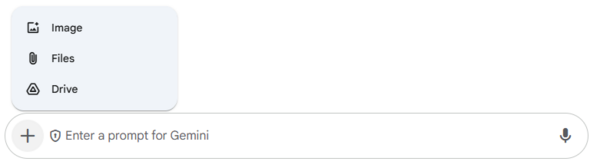
While still unable to do quantitative analysis of spreadsheets, this exciting new feature will allow users to provide their own files directly to the Gemini App chat and work directly with only those sources.
Among the many uses of this feature, you could:
- Ask Questions about Content
- Get Summaries
- Retrieve Key Data
- Suggest Edits or Revisions
Generate Images of Realistic People
Gemini App is capable of generating images using it's own Imagen 3 model, however when first offered to Faculty & Staff, it would refuse to generate any realistic images of people. Recently Google announced that it would begin offering the ability to generate realistic people in images in Gemini App.
Gemini's policy still forbids it from generative images of identifiable people or anything that violates Gemini App policy guidelines. If you are presented with a generation error, try rephrasing your prompt to avoid possibly triggering this warning.